Friday, April 13, 2012

Changing your network configuration every day?


The story :

I am stuck with changing network TCP/TP settings of my laptop from office to home. We have different network settings for every floor too.

I found this software called Network Setting Manager (NetSetMan) which I can have 6 network presets that can be easily activated wherever I go.

I can set multiple TCP/IP address, gateway and DNS so I can swap any 6 presets anytime. No need manually change network settings. You can have TCP/IP of 192.168.0.1 changed to 10.10.2.1 with a single click.

This is a must have for network support staffs.

Download NetSetMan here.

Wednesday, April 11, 2012

My list of 5 best free antivirus.


The story :

Everyone had experience with virus before. But not everyone wish to pay for it.

Fear not, here's my list of 5 best antivirus.
  1. Comodo Anti-Virus Software : Full protection. Antivirus, Firewall + Proactive Security for free. What more can I say.
  2. AVG Antivirus Free : Simple and effective antivirus. Works great. 1 year free license.Too bad no firewall.
  3. Avira Antivirus Free : Easy to install and works great. Have to renew yearly. No firewall though.
  4. Avast Antivirus Home Edition : Good antivirus but the user interface tad too troublesome.
  5. Bitdefender 2011 Free Eiditon : Solid and trust worthy antivirus.
Here another list from about.com for your reference.

PC storage full? Need cloud storage?

The Story :

I have been hearing cloud services every time I read tech news. It seems to be the next big thing after the iPad.

One should try cloud storage since you can backup your data into a safe place and also retrieve them from anywhere.

For this, I wish to share the following article with you.

(The six best personal cloud storage choices for your stuff)

Tuesday, April 10, 2012

Sharing 3G USB Modem Broadband Internet

The story :

My friend Liew has 3 PC and wish to have Internet sharing using Celcom 3G USB modem. She already has local area network connection for the 3 PC using a switch and CAT5 cable.


What I did :

Setting up the host PC :

  1. Install the USB modem and driver on the host PC
  2. Make sure the host PC can connect to Internet with the USB modem
  3. Open 'Network properties' of the USB Modem
  4. Go to 'Sharing' column 
  5. Choose 'Allow other network users to connect through this computer's Internet connection'
  6. Choose the type of network you are using to connect the PC. I choose 'Local Area Connection'.
  7. Choose 'Establish a dial-up connection whenever a computer on my network attempts to access the Internet'. (picture above)
  8. Open Local Area Connection, choose Networking - TCPIP (Version 4)
  9. Change the IP address of the host computer to 192.168.0.1, subnet mask to 255.255.255.0. Also key in the DNS of your Internet service provider. 
  10. Click OK when done. 
  11. Host PC all done. (Refer to picture below)
  12. Do not change the USB port where you connect the USB modem or else the settings might not work next time.


Setting up the client PC

  1. Go to Network Connection -  choose Local Area Connection
  2. Choose TCP/IP (Version 4)
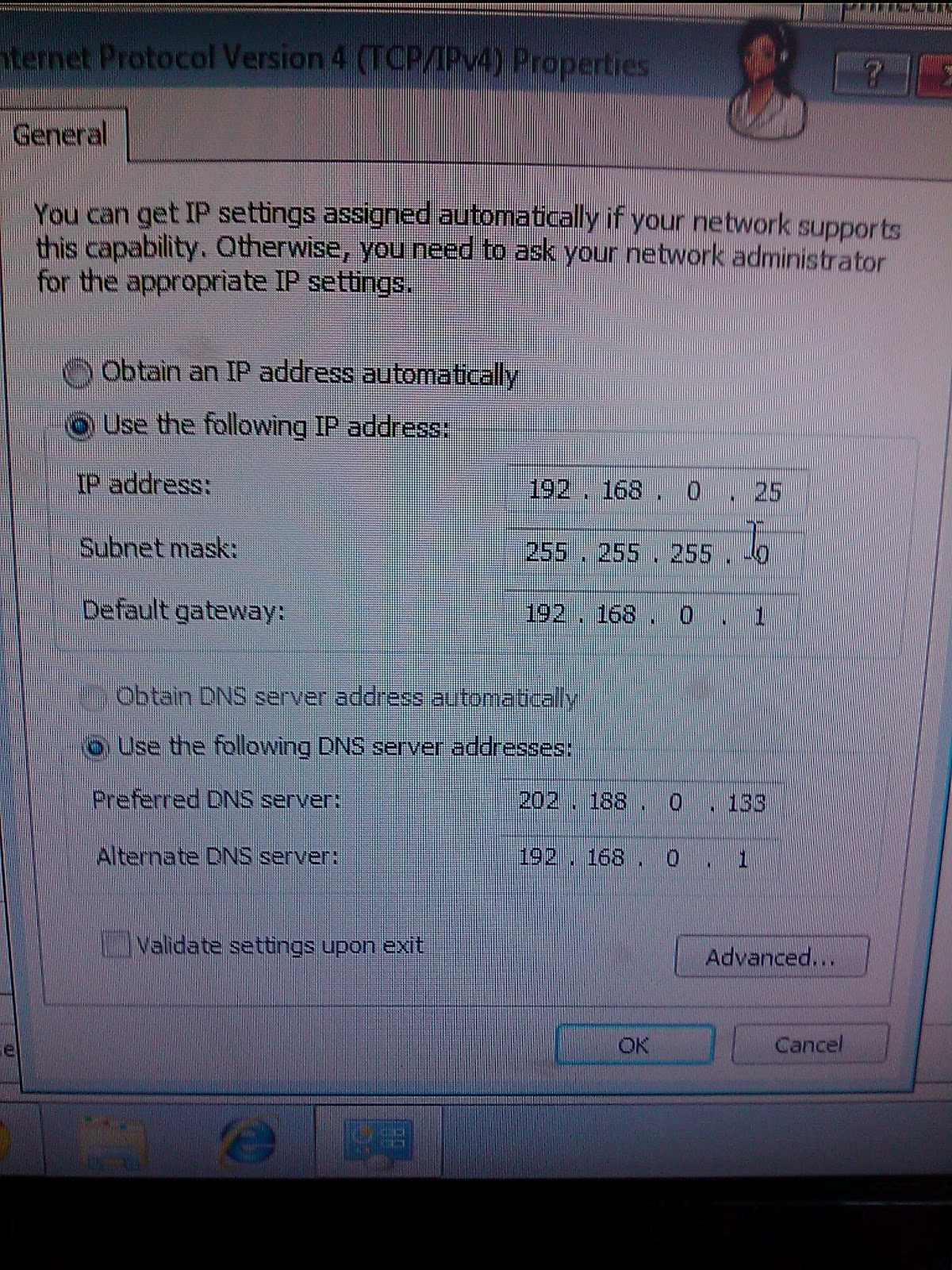
  3. Key in TCP/IP of the PC - 192.168.1.25 (192.168.0.2 to 192.168.0.254)
  4. Subnet mask - 255.255.255.0 , Gateway - 192.168.0.1 , Primary DNS - your ISP DNS, Secondary DNS : 192.168.0.1
  5. Click OK. (refer to picture below)
  6. You can use the same setting for other client PC but change the IP address from 192.168.0.25 to 192.168.0.26 etc.
  7. Restart all the PC
  8. The next time any PC open a browser, your host PC will connect to Internet and all the client PCs will be able to surf the Internet.


Additional notes :

  • I would prefer you subscribe to wireless 3G service where the provide wifi router instead of USB modem to make life easier for you. You may bypass having setup wired network for sharing to work.
  • USB Modem sharing can be done using wireless network as long as you have all you PC (host and client) connected.
  • If you have a DHCP server in your network, you may need to set the DHCP server to use the host PC IP address as Internet Gateway.

Friday, April 6, 2012

Intel B960 Processor, good or bad?


The story,

I was looking at Dell PC catalogue sourcing for a basic PC for our new staffs and came across Intel B960 CPU. The price for such system was quite a bargain.

I was afraid that it may provide slow Celeron like performance. After talking to some of my friends and checking the Internet, I was convinced that it will perform like a Intel Core i3-330M processor.

I bought the B960 system and tested it upon delivery. I found it good enough for general office use. No performance issue.

If you are looking for a desktop for paper work, B960 is OK. Don't buy this if you are using it for graphic design or games,  get an core i5 or i7 instead.

Check out below comparison :-
http://compare-processors.com/intel-core-i3-330m-vs-pentium-b960/3836/