Sunday, May 13, 2012

Which is the best desktop processor? AMD vs Intel?


The story:

I wanted to know what are the better processor to use if I need to upgrade my Core2Duo PC at home (maybe for the sake of Diablo III.. Wahaha.).

I found this article. Maybe it will help you too.

Best CPU: the 8 top processors today

Wednesday, May 2, 2012

How I started using free Office programs - Open Office and Google Docs.


The Story,
I started using Open Office since 2008. I started a business then and had limited capital. I tried free Open Office instead of Microsoft Office which will cost me.

I had downloaded Open Office and tried it. I fell in love with it and use it since then. Even I have MS Office 2010 on my laptop, I still use Open Office as my main Office Editor.

Why I like Open Office :-

  1. Simple interface and easy to use
  2. Functions are easy to access
  3. Good menu layout
  4. Able to open almost all MS Office files
  5. Spreadsheet meet all my basic need without complicated menus.
  6. Fast 
Now I also use Google Doc. It is mainly for shared document among my team members. With Google doc, my team members can update reports, notes and listing in real time and I can read it where ever I am.

No need to call, email and ask for the documents. I can access them on my Samsung Galaxy Note, My Dell Laptop and also from anyone's PC.

It's so flexible and convenient. I have the following reports in my hand :-
  •     ‎IT Daily Report
  •     ‎GPS Report 
  •     ‎Monthly Stock Movement
  •     ‎CCTV Site Record 
  •     ‎Computer Settings 
  •     ‎Software License Key
I have to tell you that Microsoft Office is still the best Office software out there. But if you are a general user and looking for an alternative, please look into Open Office and Google Docs first.

You can download Open Office here.
You can start using Google Docs here.

Here's an interesting article by CNET, How I learned to say, 'Hi, Google Docs; bye, MS Word

Additional notes:
  • Open Office isn't a cloud service. The software are installed into you PC.
  • Open Office sometime open Microsoft Office Documents a little different. Especially Office 2007 and 2010 templates. You may need to convert those files to 2003 version first.
  • Power Point 2007/2010 animation aren't all supported. 
  • Google Docs are Cloud based service. You do not have the software in your PC, you need internet access to use it and access your files.
  • You need at least broadband speed to use Google Docs properly.
  •  With cloud based Google Docs, you will not lost any files even hour Pc hard disk is damaged or even stolen. All files are stored in the Internet inside Google's Server.

Sunday, April 29, 2012

How can I make my Windows 7 machines boot up quickly

The Story,


I have been experiencing slow boot up of my own Windows 7 laptop. I found this article in Cnet forum that explain what I would normally do to solve it. Please read on.

Windows 7 forum: How can I make my Windows 7 machines boot up quickly?

Additional note :

  • Be advised that you need to have ample RAM to have any effect on Windows 7 performance. I recommend 4GB RAM and 2GB (minimal) with Dual Core processor.
  • If you have lower specification, the configuration will not be very helpful. 


Thursday, April 26, 2012

How to create hard disk image with Acronis True Image

The story :

Our mini market division has a point of sales IBM server that is a few years old. After a client POS hard disk failed, we fear that the server may also fails soon. They were purchased together.

I decided to make an image of the hard disk just in case. I will use Acronis True Image Bootable CD to create the image into an external hard disk.

I am using an older version of Acronis, the later versions may look different. I bet the functions are likely the same.

Requirements :
a) Acronis True Image Bootable CD
b) USB external hard disk
c) Server with Bootable CDROM Drive

How I do it :

1. Plug the external hard disk (USB FreeAgent Drive) into the server
2. Turn on the server
3. Insert the Acronis CD before the Windows Server start
4. The server will boot using Acronis (picture below)


5. From the Acronis main window, choose Backup (picture below)


6. It will tell you that Acronis will use a wizard to assist you. Click Next (picture below)


7. Choose the hard disk partition you want to backup to an image and click Next (picture below)


8. Choose the target to create the image (I choose Free Agent external drive D:), type in the name of the image and click Next (picture below)


9. I will have 4 option to choose from. I may password protect the image, increase compression ratio, split the image or change other parameters  (picture below) .
10. I normally just click next to proceed to image creation (picture below) 


11. After clicking Next, the image creation process will start as indicated by the progress bar (picture below)


12. Wait for the process to complete and exit.
13. With the image created, I only backup the POS database into external hard disk daily. If the server hard disk fail, I will use the Acronis CD and image (in the external hard disk) to restore the image into a new hard disk. I will then copy the backed up database into the new server hard disk (overwrite the old database in the image).

You may find out or purchase Acronis True Image here

Kenneth's note :
  • with Acronis, we can also backup the image direct to thumb driver, secondary hard disk and other partition.
  • other software like Norton Ghost can do the job as well.
  • there are free hard disk clone software such as Disk Clone but they are hard to use.


Wednesday, April 18, 2012

How to use virtual desktop - DexPot


The story,

I always need to work with multiple project at once and it's just too messy to put so many things in a single Windows desktop(screen). I have outlook, web browser for gmail, gdoc and Google calender, a few documents and Excel worksheets and GPS fleet management system client.

How nice if I can work at each group of programs on different screens. With virtual desktop, we can do it. We can switch from a few desktops with only one computer screens. We can just press some combination of keys like (alt +1 to alt +4) to switch from each screen.

I normally use 4 virtual desktops for my work. I have emails and Outlook for 1 screen, browser for another screen, projects (excel and other applications) on third screen and others on the forth screen.

I use Dexpot to do it. Dexpot allows up to 20 possible desktops. It has a well organized interface that enables easy switching among desktops with just pressing a few combination of keys.

I now can focus on a single desktop and switch to others when necessary.

Try it and you will like it. Download Dexpot here.

It's free too.

Kenneth's note

  • Some may want real multiple monitor instead of multiple virtual desk cause you can look at all the screen all the time. With virtual screen, you can only look at a single screen and preview all the virtual desktop on a split screen (not full screen).  
  • Multiple screens are achieve by adding hardware (display cards), not by software.
  • There may be some application that won;t work with virtual desktop.

Monday, April 16, 2012

Fail - Western Digital 1 TB Caviar Green


The Story,

We have 2 unit's of the mentioned model failed in 2 weeks. Both from the same batch and both only one and a half year old. Luckily WD offer 2 year warranty.

However, the Caviar Blue is reliable and works great.

You may want to read this as well. (Beware WD Green Hard Drives)

Saturday, April 14, 2012

How to use budget Edifier M3400 2.1 Speaker System for TV or PC.


The Story:

I have been using Edifier M3400 as speaker for my TV. I have a LG 32" LCD TV connected to satellite TV system.

In the beginning (without Edifier M3400), the sound isn't really good. Lack bass and thin sounding (normal for standard TV).

I wanted a budget solution for the problem but don't want a full AV system. I had a 5.1 AV system but it's too clunky and too many cables. (I throw them away after the AV amp malfunctioned).

I wanted something simple and straight forward. I went to the IT hypermarket and tested many budget 2.1 PC speakers and found that Edifier M3400 2.1 Speaker System is a good bargain. It offer clear clean high and mid range with solid deep bass. The wooden satellite speakers looks great beside the LCD TV.

I bought it and plugged it into my TV (RCA out port). Instantly, watching TV become much more enjoyable. Voice become clearer and larger. Sound effect is louder and best of all, there is good bass. I can hear the beat and punch of TV programs that I could not hear from my TV own speakers.

I also connected my Kworld Media Player to the TV. So both satellite TV and  media player are connected to the Edifier M3400 through my TV RCA out (line out) and I can enjoy good sound from both.

Do not compare this to a full AV system though. This is merely a budget (USD 70) solution to improve TV sound while using less space. This solution is good for smaller living room only ( I suggest apartment with less then 1000 sq. ft.). Don't expect this to shake a bungalow :-).

Edifier M3400  is even better on PC as you site closer to the speakers. Good gaming sound too.

There you go, I'm enjoying Movies, Discovery and History channel now with clean sound and good bass.

p.s. Edifier M3400 may be phased out in many places. I bet Edifier P3080 can do the job as well ;-)

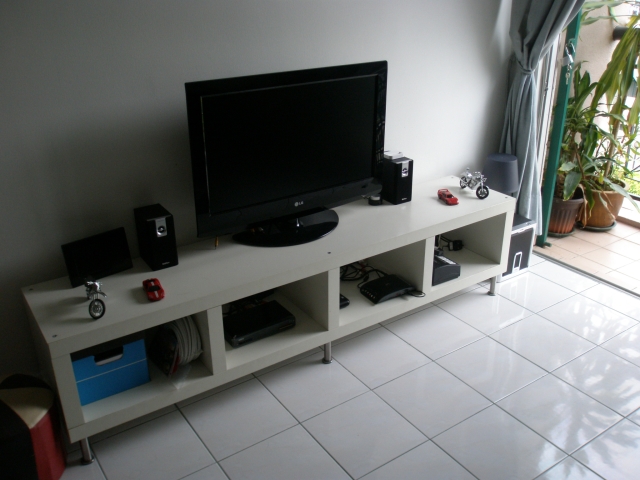
Here's my setup.


Additional note :
  • The M3400 doesn't have wireless remote control. You need to use volume control of your satellite TV decoder or TV to control the volume via their wireless remote control.
  • If your TV or satellite TV decoder can't control volume of Line out / RCA output, you may want to choose Lotitech Z Cinema (picture below) with wireless remote instead. Else, you have to manually control volume on the speaker.
  • Your wife or girlfriend  will appreciate this as they like simple TV set up. Easy for them to enjoy their favourite TV show. They care less about what AV or hi fi system you have, especially it need 4 remote controls to operate.
To connect TV to PC speaker, you need add an RCA to 3.5mm jack (connector) as below:-