Monday, April 16, 2012
Fail - Western Digital 1 TB Caviar Green
The Story,
We have 2 unit's of the mentioned model failed in 2 weeks. Both from the same batch and both only one and a half year old. Luckily WD offer 2 year warranty.
However, the Caviar Blue is reliable and works great.
You may want to read this as well. (Beware WD Green Hard Drives)
Saturday, April 14, 2012
How to use budget Edifier M3400 2.1 Speaker System for TV or PC.
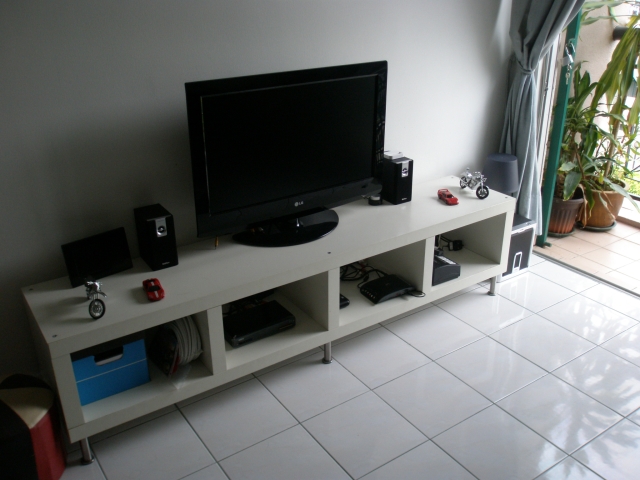
I have been using Edifier M3400 as speaker for my TV. I have a LG 32" LCD TV connected to satellite TV system.
In the beginning (without Edifier M3400), the sound isn't really good. Lack bass and thin sounding (normal for standard TV).
I wanted a budget solution for the problem but don't want a full AV system. I had a 5.1 AV system but it's too clunky and too many cables. (I throw them away after the AV amp malfunctioned).
I wanted something simple and straight forward. I went to the IT hypermarket and tested many budget 2.1 PC speakers and found that Edifier M3400 2.1 Speaker System is a good bargain. It offer clear clean high and mid range with solid deep bass. The wooden satellite speakers looks great beside the LCD TV.
I bought it and plugged it into my TV (RCA out port). Instantly, watching TV become much more enjoyable. Voice become clearer and larger. Sound effect is louder and best of all, there is good bass. I can hear the beat and punch of TV programs that I could not hear from my TV own speakers.
I also connected my Kworld Media Player to the TV. So both satellite TV and media player are connected to the Edifier M3400 through my TV RCA out (line out) and I can enjoy good sound from both.
Do not compare this to a full AV system though. This is merely a budget (USD 70) solution to improve TV sound while using less space. This solution is good for smaller living room only ( I suggest apartment with less then 1000 sq. ft.). Don't expect this to shake a bungalow :-).
Edifier M3400 is even better on PC as you site closer to the speakers. Good gaming sound too.
There you go, I'm enjoying Movies, Discovery and History channel now with clean sound and good bass.
p.s. Edifier M3400 may be phased out in many places. I bet Edifier P3080 can do the job as well ;-)
Here's my setup.
Additional note :
- The M3400 doesn't have wireless remote control. You need to use volume control of your satellite TV decoder or TV to control the volume via their wireless remote control.
- If your TV or satellite TV decoder can't control volume of Line out / RCA output, you may want to choose Lotitech Z Cinema (picture below) with wireless remote instead. Else, you have to manually control volume on the speaker.
- Your wife or girlfriend will appreciate this as they like simple TV set up. Easy for them to enjoy their favourite TV show. They care less about what AV or hi fi system you have, especially it need 4 remote controls to operate.
To connect TV to PC speaker, you need add an RCA to 3.5mm jack (connector) as below:-
Friday, April 13, 2012
Changing your network configuration every day?
The story :
I am stuck with changing network TCP/TP settings of my laptop from office to home. We have different network settings for every floor too.
I found this software called Network Setting Manager (NetSetMan) which I can have 6 network presets that can be easily activated wherever I go.
I can set multiple TCP/IP address, gateway and DNS so I can swap any 6 presets anytime. No need manually change network settings. You can have TCP/IP of 192.168.0.1 changed to 10.10.2.1 with a single click.
This is a must have for network support staffs.
Download NetSetMan here.
Wednesday, April 11, 2012
My list of 5 best free antivirus.
The story :
Everyone had experience with virus before. But not everyone wish to pay for it.
Fear not, here's my list of 5 best antivirus.
- Comodo Anti-Virus Software : Full protection. Antivirus, Firewall + Proactive Security for free. What more can I say.
- AVG Antivirus Free : Simple and effective antivirus. Works great. 1 year free license.Too bad no firewall.
- Avira Antivirus Free : Easy to install and works great. Have to renew yearly. No firewall though.
- Avast Antivirus Home Edition : Good antivirus but the user interface tad too troublesome.
- Bitdefender 2011 Free Eiditon : Solid and trust worthy antivirus.
Here another list from about.com for your reference.
PC storage full? Need cloud storage?
The Story :
I have been hearing cloud services every time I read tech news. It seems to be the next big thing after the iPad.
One should try cloud storage since you can backup your data into a safe place and also retrieve them from anywhere.
For this, I wish to share the following article with you.
(The six best personal cloud storage choices for your stuff)
I have been hearing cloud services every time I read tech news. It seems to be the next big thing after the iPad.
One should try cloud storage since you can backup your data into a safe place and also retrieve them from anywhere.
For this, I wish to share the following article with you.
(The six best personal cloud storage choices for your stuff)
Tuesday, April 10, 2012
Sharing 3G USB Modem Broadband Internet
The story :
My friend Liew has 3 PC and wish to have Internet sharing using Celcom 3G USB modem. She already has local area network connection for the 3 PC using a switch and CAT5 cable.
What I did :
Setting up the host PC :
Setting up the client PC
Additional notes :
My friend Liew has 3 PC and wish to have Internet sharing using Celcom 3G USB modem. She already has local area network connection for the 3 PC using a switch and CAT5 cable.
Setting up the host PC :
- Install the USB modem and driver on the host PC
- Make sure the host PC can connect to Internet with the USB modem
- Open 'Network properties' of the USB Modem
- Go to 'Sharing' column
- Choose 'Allow other network users to connect through this computer's Internet connection'
- Choose the type of network you are using to connect the PC. I choose 'Local Area Connection'.
- Choose 'Establish a dial-up connection whenever a computer on my network attempts to access the Internet'. (picture above)
- Open Local Area Connection, choose Networking - TCPIP (Version 4)
- Change the IP address of the host computer to 192.168.0.1, subnet mask to 255.255.255.0. Also key in the DNS of your Internet service provider.
- Click OK when done.
- Host PC all done. (Refer to picture below)
- Do not change the USB port where you connect the USB modem or else the settings might not work next time.
Setting up the client PC
- Go to Network Connection - choose Local Area Connection
- Choose TCP/IP (Version 4)
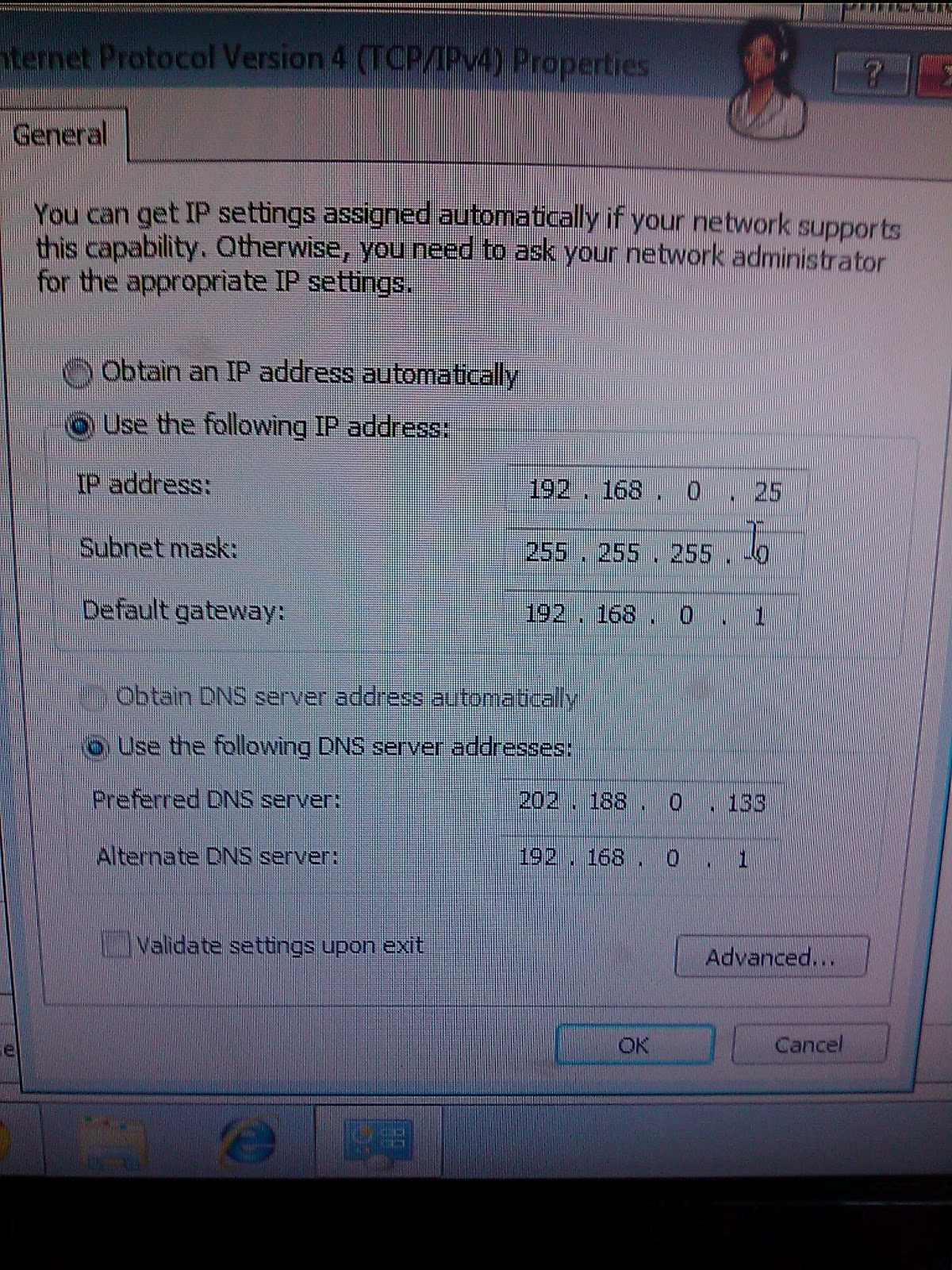
- Key in TCP/IP of the PC - 192.168.1.25 (192.168.0.2 to 192.168.0.254)
- Subnet mask - 255.255.255.0 , Gateway - 192.168.0.1 , Primary DNS - your ISP DNS, Secondary DNS : 192.168.0.1
- Click OK. (refer to picture below)
- You can use the same setting for other client PC but change the IP address from 192.168.0.25 to 192.168.0.26 etc.
- Restart all the PC
- The next time any PC open a browser, your host PC will connect to Internet and all the client PCs will be able to surf the Internet.
Additional notes :
- I would prefer you subscribe to wireless 3G service where the provide wifi router instead of USB modem to make life easier for you. You may bypass having setup wired network for sharing to work.
- USB Modem sharing can be done using wireless network as long as you have all you PC (host and client) connected.
- If you have a DHCP server in your network, you may need to set the DHCP server to use the host PC IP address as Internet Gateway.
Saturday, April 7, 2012
Subscribe to:
Comments (Atom)