
My staff told me that her PC is running really slow. I check and found that her C drive (partition) is almost full with only 450MB left. The PC slow down as Windows does not have enough space for virtual memory. (Windows uses drive C to write virtual memory unless specified otherwise).
Note :Virtual memory are like RAM. But Windows use the hard disk instead of RAM due to some programs uses more memory then the RAM memory you have.
Then, I saw that she has 45GB of unused space in drive D. I decide to resize drive C and merge the free space of drive D into C to make it bigger.
This is how I do it:
- download Easues Partition Magic from Easues website.
- install Partition Magic in the PC you want to resize.
- start Partition Magic
- check the partition information (below picture)

- I wanted to merge the 45GB of drive D into drive C (picture above)
- first, I would copy all the files in drive D into an external hard disk because the data in drive D will be deleted upon merging the partitions.
- delete the D partition by right click and choose delete, OK and Apply (picture below)
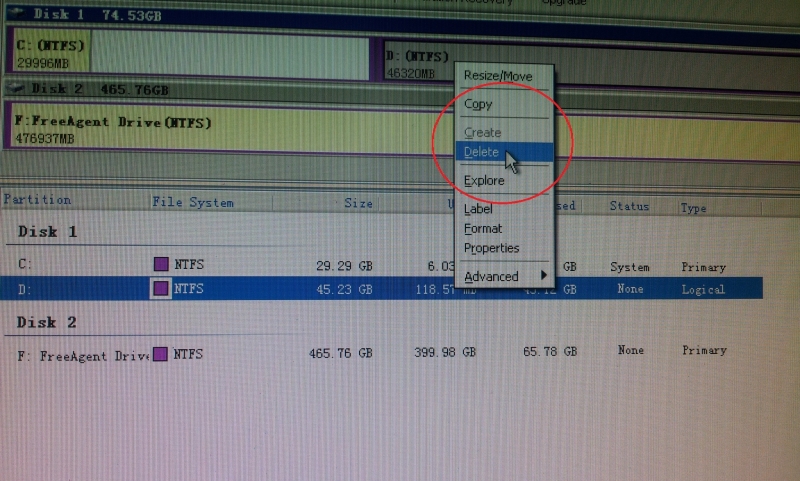


- once complete, you will see you have 45GB of unallocated space in drvie D.

- 'right click' on drive C and choose 'resize' (picture above)
- drag the partition size to the size you want (picture below)

- I wanted to make the C partition 70GB and then choose 'Apply' (pictures below)


- Once finish, I now have a 70GB drive C instead of 29GB previously
Additional note:
- Be advised the above process will only destroy data in drive D, not drive C. Once done, all files in drive C is preserved.
- Caution: I would suggest you backup all files in drive C and D into external drive before starting the above process. We never know what will happen during the process. Bad sector or power failure may render your data loss.
Want to be a PRO?
Learn to repair computer fast and easy.
Learn to repair computer fast and easy.
Ear money as a self employed or start a career as a computer repair specialist or consultant.
Get the below course and become pro yourself.


Start a prosperous journey in life.
