
Our sales department Ginny told me her PC consistently hang. Upon restart, Windows run check
disk and report repairing files. Once boot in Windows desktop, it hang again. I had removed some software such as third party CPU speed booster and antivirus software that might caused it to hang, but it happened the next day.
Specification :
- Asus P5P43TD Board
- Intel Core 2 Duo E7500 Processor
- 4 GB RAM (2+2)
- Western Digital 1.0TB Hard disk WD10EARS
- Win 7 Home Premium 32 Bit
- Windows 7 Desktop Freeze (Mouse can move but in circle& can't click anything)

How I check :
- Boot into safe mode and check event log for errors
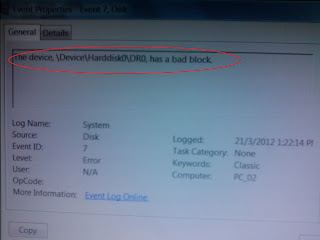
- Found the following error "\Device\Harddisk0\DR0, has a bad block" (picture below)
- Take hard disk out and connect it to another PC. Run disk diagnostic tool such as
check disk and HDDscan 3.3
What I found :
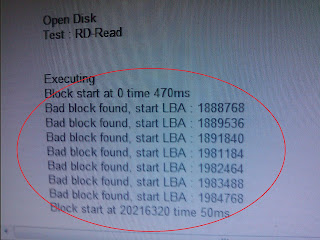
Disk check result confirm defective hard disk that caused Windows desktop to freeze (due to unable to read files) (picture below)
How I fix the problem :
- backup hard disk files in user profile (c:\users) into external hard disk (check other
partition or folders for files to backup) - change a new hard disk and re-install Windows
- restore files from external hard disk
Additional note:
- If Windows can boot to safe mode, make sure check (system) event log in control panel - administration - Event log and check for problems (!).
- Backup files to external drive before running hard disk test
- Disk utilities as disk test may further damage the hard disk and cause permanent data lost
- Despite disk utilities can repair the defective hard disk, I don't recommend to continue using the hard disk due to it may fail again soon.
